1. What Is the CSV Format: Anatomy, RFC 4180 Specification, and Data Architecture
CSV (Comma-Separated Values) is the world's most ubiquitous open text format for storing and exchanging two-dimensional tabular data. Its formal specification is codified under the IETF standard RFC 4180.
At its core, a CSV file is plain text stripped of visual overhead: each file line represents one tabular record (row), while horizontal cell values are delimited by commas. Typically, the very first row serves as the column header schema.
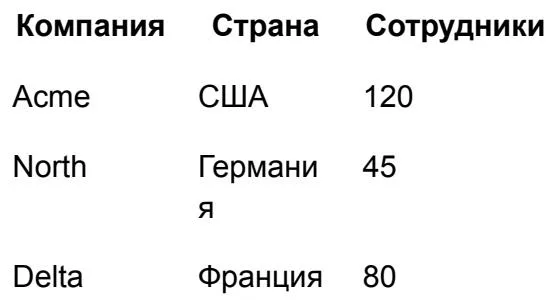 Visual representation of tabular data in documents
Core Formatting Invariants Under RFC 4180
- Line Terminators: Each record resides on a separate line terminated by standard line feeds (
CRLForLF). - Mandatory Quotes: Any field value containing a comma, a line break, or double quotes must be fully enclosed in double quotation marks:
"New York, NY". - Quote Escaping: Internal quotation marks within a string must be escaped by doubling them:
"Acme ""Advanced"" Solutions". - Column Count Uniformity: Every subsequent record row must maintain the exact same column count defined in the initial header row.
CSV files preserve pure data values exclusively. They store zero font data, cell background colors, column width coordinates, or computational formulas. This extreme minimalism is precisely what makes CSV the universal bridge between AI models, SQL databases, and SaaS APIs.
2. Why CSV Is the Most Token-Efficient Format for LLMs and AI Agents
Modern Frontier LLMs (GPT-4o, Claude 3.5 Sonnet, Gemini 1.5 Pro) can parse both CSV and XLSX workbooks. However, across automated software pipelines and autonomous agents, CSV remains the default industry transport mechanism.
Core Advantages for Artificial Intelligence Systems
- Exceptional Token Conservation: Unlike XLSX (a zipped archive of dozens of verbose XML sheets) or JSON (which repeats every attribute key for every single array element), CSV defines field keys exactly once in the header.
- Minimal Context Window Latency: Large language models reason through flat delimiters without wading through nested tags or styling metadata.
- Native Streaming Ingestion: AI backends can generate and stream CSV responses line-by-line in real time, processing multi-gigabyte datasets in modular chunks.
- Seamless Code Interpreter Compatibility: Data analysis sandboxes in ChatGPT and Claude execute instant dataset analysis with a single
pandas.read_csv()invocation.
3. Comparative Matrix: CSV vs. XLSX vs. JSON
Selecting the correct format depends on whether you require bare tabular records, multi-tab computational spreadsheets, or complex nested trees.
 Feature comparison matrix for CSV and XLSX
| Architectural Feature | CSV | XLSX (Excel) | JSON |
|---|---|---|---|
| Tabular Rows & Columns | ✓ Yes | ✓ Yes | Requires flat normalization |
| Multiple Named Worksheets | ✗ No (Single flat sheet) | ✓ Yes | ✓ Via nested array keys |
| Computational Formulas | ✗ No | ✓ Yes (Live calculation engine) | ✗ No |
| Cell Styling & Formatting | ✗ No | ✓ Yes (Colors, fonts, widths) | ✗ No |
| Hierarchical Nested Data | ✗ Poor (Flattens structures) | ✗ Limited | ✓ Native object trees |
| AI Token Efficiency | ⭐ Highest | ⚠️ Lowest (Heavy XML overhead) | 🟡 Moderate (Key redundancy) |
| Direct CRM / DB Bulk Import | ✓ One-click native import | ⚠️ Requires pipeline conversion | ⚠️ Requires custom mapping |
Use CSV whenever your primary goal is mass data transformation, tabular classification, or database migration. Preserve XLSX only when communicating financial models to humans who depend on live formula recalculations.
4. Common Syntax Pitfalls: Delimiters, Quoting Rules, and UTF-8 Encodings
Despite its deceptive simplicity, over 70% of automated CSV ingestion failures stem from three technical edge cases.
The Comma vs. Semicolon Collision (European Locales)
In many European countries, the standard decimal separator is a comma (12,50). Consequently, regional desktop Excel installations default to exporting CSV files delimited by semicolons (;) rather than standard commas (,).
- If an AI model expects commas but receives semicolons, it treats entire rows as single concatenated strings.
- Always include an explicit delimiter instruction in your prompt: “Use standard comma-delimited formatting”.
Multiline Line Breaks Within Cell Values
When descriptive text contains paragraph breaks, poorly configured parsers interpret each newline as a brand-new table row. Under RFC 4180, multiline cells must be strictly wrapped inside double quotes:
UTF-8 Character Encoding and the BOM Signature
Opening Cyrillic or multilingual CSV files in older Windows Excel versions frequently results in corrupted characters. This occurs when the file lacks a BOM (Byte Order Mark — the three bytes EF BB BF).
- For modern cloud databases and AI APIs, output clean UTF-8 without BOM.
- If the file is specifically destined for legacy desktop Excel on Windows, export as UTF-8 with BOM.
5. Preparing CSV for AI: Data Sanitation and Cleanliness Protocols
The analytic accuracy of an LLM is directly proportional to the structural cleanliness of its input dataset.
Before and After Data Sanitation
6. Batch Data Processing: Automated Cleaning, Enrichment, and Classification
CSV delivers its highest ROI when orchestrating bulk data transformations through ChatGPT Advanced Data Analysis or Claude Code.
Primary Production Automation Scenarios
- Deduplication & Entity Resolution: Merging duplicate company profiles (e.g. “Google LLC” and “Google Inc”) and filtering corrupted contact rows.
- Automated Attribute Enrichment: Scanning raw company lists to infer industry verticals, estimated revenue tiers, or country codes.
- Sentiment & Intent Tagging: Ingesting 10,000 customer feedback comments to append structured
Sentiment(Positive/Neutral/Negative) andCategory(Billing/Product/Bug) attributes. - Canonical Geographic Normalization: Harmonizing disparate country strings (“USA”, “U.S.”, “United States”, “America”) into ISO alpha-2 codes (
US).
7. When CSV Is the Wrong Choice: Architectural Limitations and Alternatives
CSV is a specialized tool. Misapplying it to multidimensional data structures causes severe architecture breakdowns.
Four Critical Constraints of CSV
- Complex One-to-Many Relationships: Storing a client with 5 shipping addresses, 3 payment methods, and 20 line-item orders inside a flat CSV row leads to unmanageable duplication. Use JSON for hierarchical schemas.
- Formula Auditing & Logic Modeling: If you need to trace how modifying an assumption in cell
B2impacts EBITDA inG48, rely on XLSX. CSV strips all calculation logic, leaving only static numbers. - Customer-Facing Business Documents: Proposals, formal agreements, and operational SOPs require page numbering, corporate typography, and logos. These belong in DOCX.
- Unstructured Knowledge & Articles: Reports, research papers, and technical guides lose context when coerced into tables. Maintain them in Markdown.
8. Programmatic Automation: Working with CSV in Python and TypeScript
In autonomous production agents, CSV processing is handled by high-performance libraries that stream records without memory spikes.
9. Battle-Tested Master Prompt Library for CSV Operations
Employ these structured prompt templates to extract and enrich datasets without dropped rows or malformed columns.
Prompt for Generating a Dataset from Scratch:
Prompt for Cleaning and Enriching an Existing Dataset:
10. Pre-Flight Validation Checklist and Format Selection Decision Tree
Execute this rapid checklist prior to ingesting CSV payloads into production databases or CRM integrations.
CSV Quality Assurance Checklist
- Column Parity: The count of delimiter commas matches across every row against the initial header count.
- Enclosure Verification: All text fields containing commas or line feeds are safely enclosed in double quotes
" ". - Zero Decorative Spacers: No empty separator rows exist in the header, body, or footer.
- Character Encoding: File is validated as UTF-8 (and verified for BOM compatibility if targeting desktop Windows Excel).
- Uniform Data Types: Dates adhere strictly to ISO 8601 (
YYYY-MM-DD), and numeric floats use periods rather than decimal commas.
Quick Decision Tree
- Raw tabular data for mass processing, filtering, or automated code $\rightarrow$ CSV.
- Living calculation models featuring formulas, charts, and multiple sheets $\rightarrow$ XLSX.
- Complex, multi-level nested data trees for API integrations $\rightarrow$ JSON.
- Polished, branded corporate documents for human reading and archiving $\rightarrow$ DOCX.