1. Installing Claude Code and Environment Setup
Claude Code is installed as a standalone command-line interface (CLI) designed for deep agentic interactions with your codebase via Anthropic models. Unlike standard web chat assistants, Claude Code directly accesses the filesystem, executes terminal commands, analyzes project dependency trees, and makes atomic file edits.
1.1. CLI Installation Methods: Native Script vs npm
The developer-recommended installation method is the native system installer script, which configures binaries and runtime environments automatically. Alternatively, for development environments with an existing Node.js toolchain, npm global installation remains supported:
After installation finishes, verify that the CLI is working properly by running claude --version in your terminal.
1.2. Navigating to the Project Directory and Authentication
Before launching the tool for the first time, you must navigate into the root directory of your target project:
💡 Why this matters: Claude Code binds long-term project memory, local rules, and security permissions to the active working directory. Launching from your home directory (
~) or desktop strips the agent of repository architectural context.
On first launch, the tool prompts you to authenticate:
- OAuth login via browser using an active Claude subscription (Pro, Max, or Team).
- Anthropic Console API key for pay-as-you-go token billing at standard API rates.
In addition to the standalone terminal, Claude Code supports an official VS Code extension, a JetBrains plugin, a desktop app, and the claude.ai web interface. All of these interfaces share the same underlying .claude/ configuration files, ensuring settings remain consistent regardless of your chosen workspace interface.
2. The Three Files That Define Everything: Memory and Settings Architecture
Claude Code relies on a two-tier configuration hierarchy: the local project directory .claude/ (along with CLAUDE.md in the project root) and the global directory ~/.claude/ in the user's home folder. Global configurations apply to all sessions on the machine, while local settings take precedence for the current repository.
2.1. CLAUDE.md and Repository Memory Rules
CLAUDE.md serves as persistent project memory that Claude ingests at the start of every session in this repository. It documents architectural principles, test commands, code conventions, and technology stacks.
| Mechanism | Location | Purpose |
|---|---|---|
| Root Guide | CLAUDE.md | Core instructions and stack overview (recommended up to 2500 tokens). |
| Modular Rules | .claude/rules/*.md | Path-specific instructions loaded conditionally for matching files. |
| Memory Generator | /init command | Scans the codebase automatically and generates an initial template. |
| Memory Editor | /memory command | Opens project memory for fast interactive editing during a session. |
⚠️ Core Memory Principle: Instructions given only in chat messages will inevitably be lost once context compression triggers in long sessions. Any rule that must persist across sessions must be recorded in
CLAUDE.md.
2.2. settings.json and the Auto Memory Mechanism
The configuration file settings.json (located at .claude/settings.json for project scope or ~/.claude/settings.json for global defaults) controls tool permissions, system hooks, environment variables, and default model selection.
The Auto memory feature allows Claude Code to automatically persist working observations across sessions without manual user curation. You can disable this behavior using "autoMemoryEnabled": false in settings or by exporting CLAUDE_CODE_DISABLE_AUTO_MEMORY=1 if you prefer strict manual memory management via CLAUDE.md.
3. Configuring Permissions and Hooks in Advance
To maintain a secure development workflow and prevent repetitive authorization prompts, Claude Code offers interactive execution modes and granular rule declarations.
3.1. Interactive Permission Modes and the allow/ask/deny Matrix
You can cycle through interactive permission modes at any time using Shift+Tab:
- Default — prompts for manual confirmation before every potentially risky tool call or file modification.
- Auto-Accept Edits — applies file edits without confirmation while still prompting for system commands.
- Plan Mode — read-only exploratory mode where no files are modified and no terminal commands run until the plan is approved.
To eliminate repetitive prompts for safe routines, configure a declarative permission matrix in .claude/settings.json:
The deny rule always takes absolute priority: even if Read(**) grants global read access, Read(.env) strictly guarantees that secrets and environment variables are never ingested into the model context.
3.2. Automation via PostToolUse and PreToolUse Hooks
Hooks allow you to execute shell scripts before or after Claude invokes internal tools.
For instance, a PostToolUse hook automatically formats any modified file using Prettier:
Meanwhile, a PreToolUse hook can programmatically intercept and block dangerous terminal commands before they ever execute in your shell:
Exit code 2 signals to Claude Code that the operation was blocked on security grounds, terminating execution immediately.
4. Commands Worth Learning First
While Claude Code features over sixty built-in slash commands, mastering a core set is sufficient for maximum daily productivity.
4.1. Core and Advanced Slash Commands Reference
The table below outlines the most impactful CLI commands categorized by function:
| Command | Category | Purpose and Behavior |
|---|---|---|
/init | Setup | Analyzes repository structure and generates a starter CLAUDE.md. |
/memory | Setup | Opens project memory directly for editing. |
/clear | Context | Resets the conversation history while preserving project memory. |
/compact [focus] | Context | Summarizes conversational context while retaining specified topics. |
/context | Context | Displays current token usage and context window status. |
/plan | Planning | Switches CLI into read-only mode to design step-by-step implementation plans. |
/diff | Verification | Opens an interactive viewer of all uncommitted changes in the session. |
/code-review [--fix] | Verification | Inspects pending diffs for bugs and code quality flaws. |
/security-review | Verification | Dedicated security audit for potential vulnerabilities in recent changes. |
/resume [session] | Navigation | Resumes a previous session by identifier or alias. |
/branch [name] | Navigation | Forks the current conversation into a separate branching session. |
/rewind | Navigation | Reverts code or conversation state back to a previous checkpoint. |
/model | Performance | Switches the active model (Sonnet, Haiku, Opus) mid-session. |
/effort | Performance | Adjusts reasoning effort and thinking budget (from low to max). |
/cost | Performance | Displays session token consumption and total API costs. |
/agents | Delegation | Manages specialized subagents and background tasks. |
/permissions | Configuration | Interactive menu for auditing and updating permission rules. |
/hooks | Configuration | Diagnostics interface for inspecting registered system hooks. |
/doctor | Diagnostics | Runs comprehensive health checks on environment, keys, and network. |
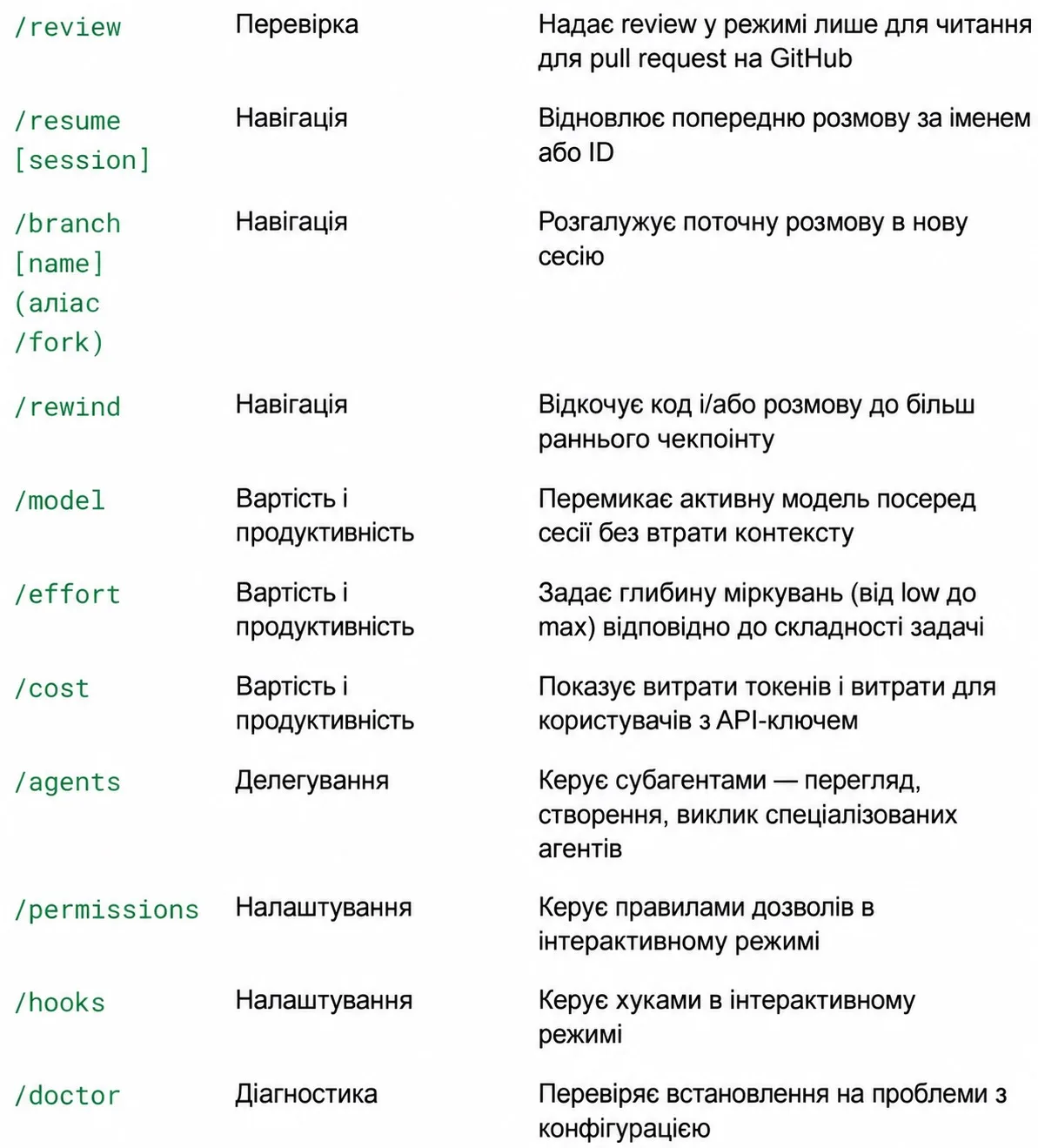 Claude Code built-in slash commands reference and navigation
4.2. Daily Productivity Triad: /compact, /plan, and /diff
To accelerate proficiency, focus on mastering these three commands first:
/plan— run at the beginning of any non-trivial task. This eliminates haphazard file modifications and ensures architectural alignment before code is written./compact— execute every 20–30 minutes of deep coding or after finishing a major step to prevent context degradation and latency spikes./diff— review uncommitted changes before every git commit to verify the integrity of model-generated code.
5. Creating Your Own /truth Verification Command
The /truth command is not built into Claude Code by default, but it solves a fundamental agentic challenge: the tendency of models to report tasks as complete without verifying actual disk state.
5.1. Fact Verification Against the Live Codebase
When an agent claims: "I updated the TypeScript interface in file X and fixed imports in file Y", it may simply be reflecting its conversational intentions. The purpose of /truth is to force a complete re-read of disk contents and compare claims against actual git diff output.
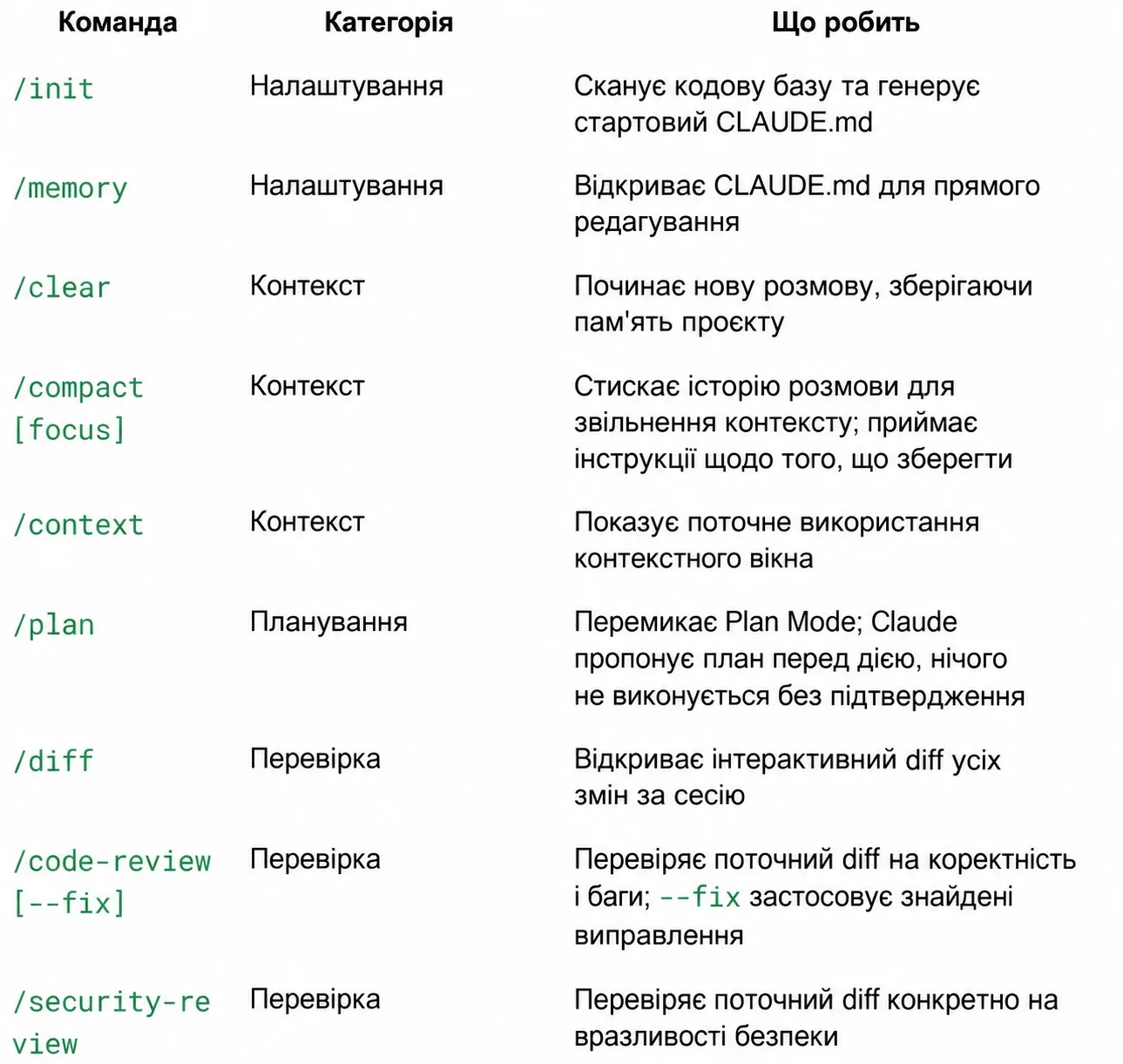 Interactive context, session, and command management in Claude Code
5.2. Implementing the .claude/skills/truth/SKILL.md Custom Skill
Custom commands are implemented as skills. Create the file .claude/skills/truth/SKILL.md in your project repository:
By scoping allowed-tools to read-only capabilities plus git diff, the verification command cannot modify files, functioning as an impartial verification checkpoint.
6. Subagents and Parallel Workflows
Working on large-scale refactorings or comprehensive audits can easily saturate the primary session context window.
6.1. Context Isolation and Specialized Subagents (/agents)
A subagent is an independent Claude Code worker with its own isolated context, custom tools, and targeted system prompt. It tackles a delegated subtask in the background and reports back only a concise summary to the parent session.
You can also define persistent custom subagents under .claude/agents/code-reviewer.md:
- Restrict permissions to read-only tools (
Read,Grep,Glob). - Assign a faster, cost-effective model.
- Prohibit direct code modifications, ensuring dedicated review without unintended regressions.
6.2. Scaling Tasks via Worktrees and Batch Execution (/batch)
For concurrent work across independent subsystems, Claude Code supports Git Worktrees and the /batch command:
- Git Worktree Isolation (
--worktree): multiple agents work concurrently in separate checkouts without file-locking conflicts. - Batch Processing (
/batch): automates repetitive refactoring or test coverage tasks across multiple modules simultaneously.
7. Production-Ready CLAUDE.md and settings.json Templates
The following production-tested templates provide an immediate foundation for your repository.
7.1. Starter CLAUDE.md Memory Template
Save this template as CLAUDE.md in the root of your project:
7.2. Production .claude/settings.json with Security Hooks
Save this configuration as .claude/settings.json:
For developer-specific machine overrides, use .claude/settings.local.json and keep it ignored in .gitignore.
8. Conclusion and Workspace Readiness Checklist
A high-performance agentic setup differs from basic chat prompts through proactive guardrails, reliable memory, and automated verification loops.
8.1. Core Principles of Agentic Engineering
- Keep Context Trim: use
/compactfrequently and delegate verbose audits to subagents. - Commit Knowledge to Memory: formalize project rules in
CLAUDE.mdrather than repeating them in chat prompts. - Verify Every Step: rely on
/truthand/diffbefore staging and committing changes.
8.2. Initial Workspace Readiness Checklist
| Milestone | Action | Target Status |
|---|---|---|
| CLI Installation | Install native Claude Code CLI and authenticate | Mandatory |
| Project Memory | Add CLAUDE.md with stack, commands, and rules | Mandatory |
| Permissions | Set up allow, ask, and deny rules in settings.json | Mandatory |
| Formatting Hook | Enable PostToolUse for automatic Prettier formatting | Recommended |
| Security Guard | Connect block-dangerous-bash.py via PreToolUse | Recommended |
| Custom Skill | Configure verification tool .claude/skills/truth/SKILL.md | Recommended |