# How to Write and Test SKILL.md Patterns: The Complete Engineering Guide
> A professional engineering guide to developing AI agent skills: four mandatory sections of SKILL.md, Codex and Claude Code synchronization, composition patterns, 5 essential tests, and regression prevention.
## 1. Architecture and Mandatory Sections of a SKILL.md File
A **SKILL.md** file is an engineering asset that transforms a general-purpose large language model into a specialized domain engineer dedicated to executing a single, well-defined operational workflow. It does not replicate global repository invariants; rather, it injects narrow, highly tactical procedural knowledge.
Before authoring a skill for your codebase, always audit the project's foundational instruction files (`AGENTS.md` or `CLAUDE.md`). These documents serve as the single source of truth for critical safety protocols, build toolchains, and environment configurations. The purpose of the skill is to teach execution structure and procedural mastery while referencing—never copying—system invariants.
```mermaid
flowchart TD
subgraph Structure ["Four Essential Components of a Production SKILL.md"]
F["1. Frontmatter Description
(Written strictly as a CONDITION, not a topic)"]
T["2. When to Trigger
(Explicit contextual boundaries and trigger criteria)"]
P["3. Procedure
(Numbered steps with validated commands and real paths)"]
Pit["4. Pitfalls & Failure Modes
(Specific Action + Direct Consequence + Exact Fix)"]
end
F --> T --> P --> Pit
```
### Breakdown of Mandatory Sections
1. **Frontmatter Description:** The sole block of text the agent parses prior to deciding whether to load the skill. It must be framed as a predictive condition ("Use when..."), rather than an abstract topical subject.
2. **When to Trigger:** A granular explanation in clear technical prose outlining specific user intents, terminal errors, or Git operations that require this skill to fire.
3. **Procedure:** A deterministic numbered sequence featuring validated local commands and verified filesystem paths.
4. **Pitfalls:** An inventory of documented failure modes. Every entry must strictly follow the formula: *Specific Incorrect Action* → *Direct Technical Failure* → *Verified Remediation*.
> [!NOTE]
> If a procedure concludes with a deployment or release step, do not replicate the release pipeline inside the skill. Instead, conclude with a reference: "Invoke the ship-pipeline skill."
---
## 2. Storage Layout: Synchronizing Across Codex and Claude Code
In modern developer environments, engineers frequently switch between client runtimes (e.g., **OpenAI Codex** in the terminal or IDE and **Claude Code**). While both runtimes adhere to the open Agent Skills specification, they discover skills within distinct repository directories.
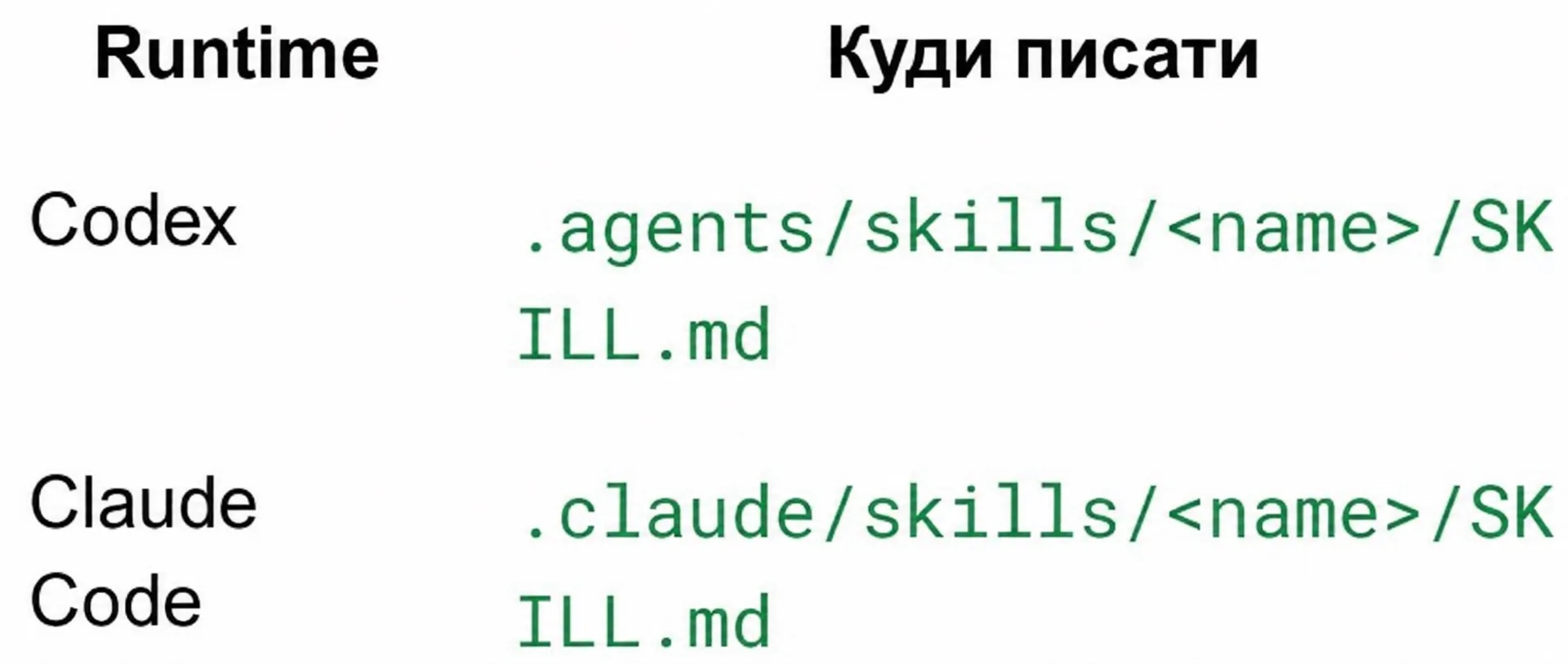
### Runtime Storage Matrix
| Agent Runtime | Target SKILL.md Path | Discovery Behavior |
| :--- | :--- | :--- |
| **OpenAI Codex** | `.agents/skills//SKILL.md` | Ingested by Codex during local workspace scanning |
| **Anthropic Claude Code** | `.claude/skills//SKILL.md` | Ingested by Claude Code during session initialization |
> [!IMPORTANT]
> **Dual Synchronization Requirement:** A skill placed solely within `.claude/skills/` remains completely invisible to Codex agents, and vice versa. Always maintain skills simultaneously across both directory paths or configure filesystem symlinks.
---
## 3. Production Readiness Criteria and Draft Validation
Before committing a skill to a team repository, audit it against this standard engineering rubric:
- **Falsifiable Trigger:** You can immediately identify at least two neighboring user queries within the same technical domain that should **NOT** activate the skill.
- **Audited Commands:** Every shell command appears in the Local Commands section of the system's `AGENTS.md` file.
- **Evidence-Based Pitfalls:** Each entry in Pitfalls reflects a genuine, previously encountered incident rather than generic advice like "be careful."
- **Context Economy:** Reading the entire skill text takes fewer than 3 minutes (under 500 lines).
- **Zero Invariant Duplication:** No paragraph copies global guidelines from `AGENTS.md`.
```mermaid
flowchart LR
Draft["Draft Skill
(Topic-based trigger, duplicate rules, vague steps)"] --> Review{"Readiness Review"}
Review -->|Deficiencies Found| Fix["Refine Triggers and Validate Commands"]
Fix --> Review
Review -->|All Criteria Passed| Prod["Production-Ready Skill"]
```
---
## 4. Composition Patterns: Routers, References, and Chains
Real-world engineering workflows rarely fit within a single isolated file. Packing an entire domain into a monolithic `SKILL.md` leads to context window bloat and instruction drift. Implement these three proven architectural composition patterns:
### Pattern 1: Entry Router
A high-level router skill maintains an architectural map and delegates tasks to specialized sub-skills without executing procedural steps itself:
```text
Prompt: "Optimize database query performance"
└── db-router (Entry Router)
├── Dispatches to: neon-migrations (if schema changes required)
└── Dispatches to: drizzle-index-optimizer (if indexing required)
```
### Pattern 2: Reference Files
The primary `SKILL.md` outlines the core operational workflow, while exhaustive schemas, grammars, and checklists reside in `references/`:
```text
.claude/skills/fleet-coordinator/
├── SKILL.md # Core orchestration pipeline
└── references/
├── agent-roles.md # Role matrix and task boundaries
└── file-ownership.md # Concurrency write rules
```
### Pattern 3: Skill Chains
Skills link to one another as sequential lifecycle milestones using `relatedPaths` or direct markdown notices:
```markdown
> Following successful schema validation, immediately invoke the drizzle-migration-runner skill.
```
---
## 5. Refactoring Strategies: When to Split vs. Merge Skills
Knowing when to decompose or consolidate skills ensures long-term maintenance hygiene.
:::tabs
@tab Decompose (Split)
- **Divergent Activation Triggers:** Scenarios require mutually exclusive configurations (e.g., read-only code review vs. direct schema migrations).
- **Disparate Architectural Surfaces:** The skill attempts to regulate both public marketing UI (Tailwind) and backend servers (NestJS, SQL).
- **Context Window Bloat:** The file exceeds 500 lines, and the agent begins skipping intermediate instructions.
@tab Consolidate (Merge)
- **Tightly Coupled Execution:** Two small skills always execute consecutively, and neither has standalone utility.
- **Code Duplication:** Separating them causes identical validation commands to be copied across two files.
:::
> [!TIP]
> In 90% of architectural dilemmas, the correct answer is to **split**. Building an "all-in-one backend skill" invariably produces an unwieldy monolith prone to hallucinations.
---
## 6. Versioning Contracts and the Flagship Compilation Pipeline
In enterprise codebases, skills are stratified into three tiers based on distribution and build requirements:
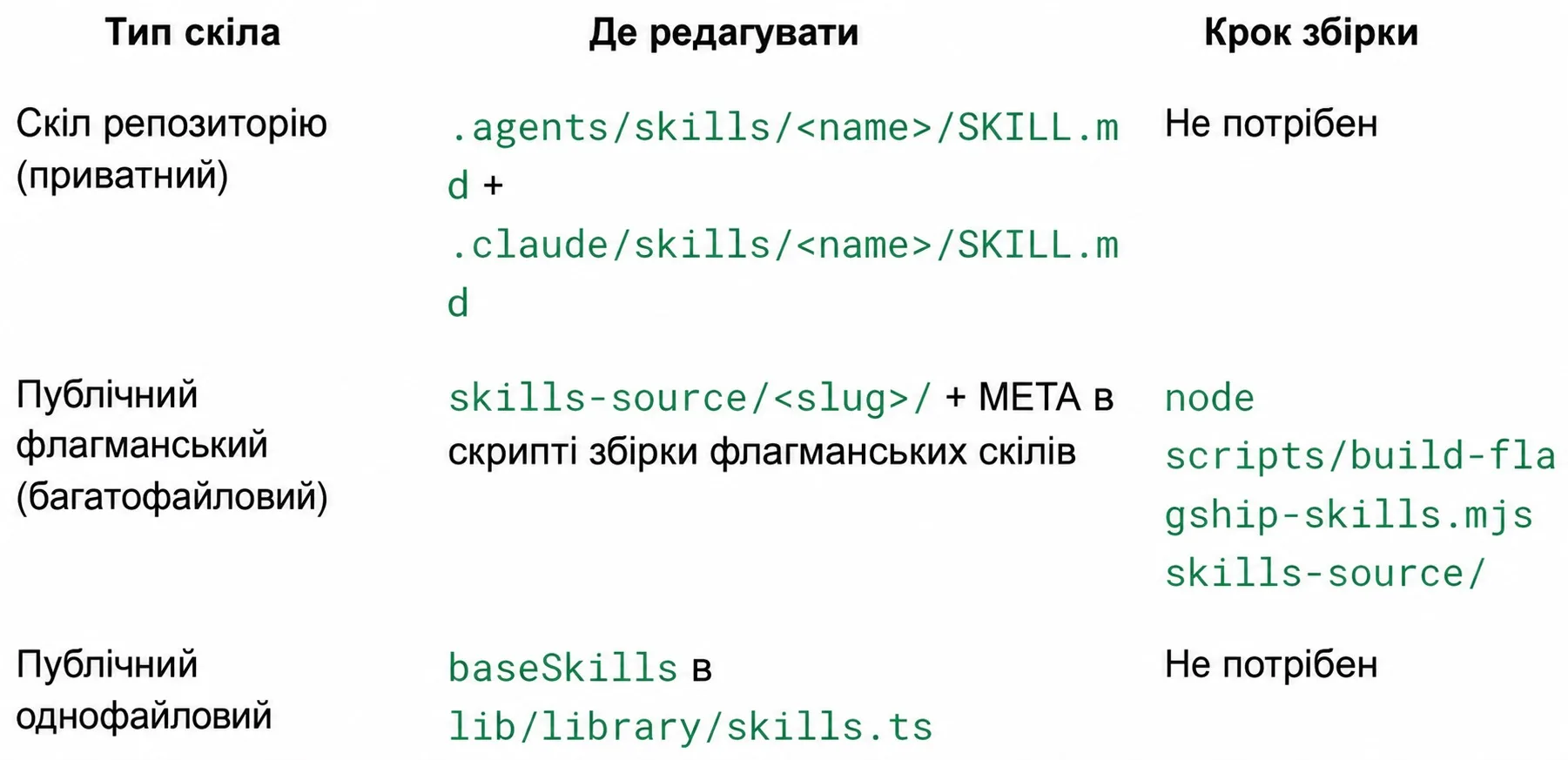
| Skill Tier | Source Code Location | Build Pipeline | Application Scope |
| :--- | :--- | :--- | :--- |
| **Private Repository Skill** | `.agents/skills//SKILL.md` + `.claude/skills//SKILL.md` | **None** (read directly) | Internal team rules for the current repository |
| **Public Multi-File Flagship** | `skills-source//` + generator metadata | `node scripts/build-flagship-skills.mjs skills-source/` | Complex modular packages with references for registries |
| **Public Single-File Skill** | `baseSkills` in `lib/library/skills.ts` | **None** | Lightweight baseline skills for platform catalogs |
> [!WARNING]
> **Never Edit Compiled Outputs Directly:** Avoid manual modifications to compiled flagship skill artifacts. Always edit the source files in `skills-source//` and rerun the compilation script.
---
## 7. Testing Methodology: The Five Essential Quality Probes
Authoring instructions is only half the battle. Prior to deploying a skill, run it through this five-stage sequential testing protocol:
```mermaid
flowchart TD
T1["1. Trigger Probe
(3 positive + 2 negative test prompts)"] --> T2["2. Procedure Walk-Through
(Live repository execution)"]
T2 --> T3["3. Pitfall Audit
(Verify Action + Failure + Fix formula)"]
T3 --> T4["4. Scope Test
(One-sentence single responsibility verification)"]
T4 --> T5["5. Staleness Check
(Verify paths and commands against active repo)"]
T5 --> Ready["Approved for Production"]
```
### Execution Protocol Details
1. **Trigger Probe:** Draft 3 prompts that must activate the skill, and 2 neighboring prompts that must not. Verify that the frontmatter description cleanly segments the two groups.
2. **Procedure Walk-Through:** Execute every step manually in a live terminal. If a step leaves you wondering "how do I configure X?", an essential prerequisite is missing from the skill.
3. **Pitfall Audit:** Confirm that every listed failure mode reflects an actual historical breakdown, paired with an effective remediation command.
4. **Scope Test:** State the skill's objective in a single sentence. If the description requires the conjunction "and also", decompose it into two separate skills.
5. **Staleness Check:** Validate every shell command, package dependency, and path against the active repository state.
---
## 8. Anti-Pattern Anatomy: Distinguishing Production Skills from Drafts
Comparing draft flaws against production-ready traits accelerates pre-flight auditing.
| Dimension | Unfinished Draft | Production-Ready Skill |
| :--- | :--- | :--- |
| **Trigger Phrasing** | Broad topic: *"For database operations"* | Sharp condition: *"Use when executing Drizzle database migrations"* |
| **Procedural Clarity** | Ambiguous advice: *"run linter if needed"* | Deterministic command: *"run npm run lint:fix"* |
| **Risk Articulation** | Vague warning: *"be careful with files"* | Concrete failure: *"staging non-existent files aborts git add"* |
| **Rule Lineage** | Copies text verbatim from `AGENTS.md` | Directly links to sections in `AGENTS.md` |
| **Runtime Presence** | Installed only in `.claude/skills/` | Dual-synced across `.agents/` and `.claude/` |
---
## 9. Preventing Failure Modes: Refusing to Duplicate AGENTS.md
The most insidious failure mode in skill authoring is copying global project conventions (such as formatting rules, commit guidelines, or branching strategies) directly into `SKILL.md`.
```text
The Destructive Lifecycle of Invariant Duplication:
1. Developer copies rule from AGENTS.md into SKILL.md.
2. Weeks later, the team updates the convention in AGENTS.md.
3. The local SKILL.md retains the stale rule definition.
4. The AI agent encounters contradictory system signals and hallucinates.
```
### Defensive File Staging in Git
When scripting staging operations in a skill, always guard against non-existent file paths that silently abort Git staging:
```bash
# Unsafe (if one path is missing, the entire command fails silently):
git add src/generated/schema.ts src/types/db.ts
# Defensive (verifies path existence before staging):
[ -e src/generated/schema.ts ] && git add src/generated/schema.ts
[ -e src/types/db.ts ] && git add src/types/db.ts
```
---
## 10. Production Readiness Checklist
Before committing any custom skill to source control, verify every item:
- [ ] Dual-synchronized in both `.agents/skills//SKILL.md` and `.claude/skills//SKILL.md`.
- [ ] Frontmatter `description` begins with "Use when..." and specifies unambiguous trigger boundaries.
- [ ] Successfully validated across all 5 testing stages (Trigger, Procedure, Pitfall, Scope, Staleness).
- [ ] Free of ambiguous modifier words ("as appropriate", "if needed").
- [ ] Every CLI command has been verified in a live development shell.
- [ ] Global guidelines reference `AGENTS.md` without duplicating text.