# Hermes Agent: The Complete Guide to First-Time VPS Setup and Deployment
> A step-by-step engineering guide to deploying the self-learning Hermes AI agent on a VPS: comparison with OpenClaw and Paperclip, Docker setup, OpenRouter budget optimization, and compounding skill generation.
## 1. Agent Architecture and Selection: Hermes, OpenClaw, or Paperclip
In the 2026 autonomous agent landscape, no single tool fits every operational scenario. Three prominent open-source systems—**Hermes**, **OpenClaw**, and **Paperclip**—embody fundamentally different architectural paradigms. Rather than competing directly, they often run concurrently within production environments on a single server.
```mermaid
flowchart TD
subgraph Ecosystem ["Three Architectural Agent Paradigms"]
H["Hermes Agent
Continuous Self-Learning Specialist
(Compounds experience in MEMORY.md and creates autonomous skills)"]
O["OpenClaw
Multi-Channel Gateway & Employee
(50+ chat channels, static SOUL.md system prompts)"]
P["Paperclip
Virtual Company Orchestrator
(CEO hierarchy, governance gates, budget guardrails)"]
end
VPS[("Single VPS Server (Ubuntu + Docker)")] --> H
VPS --> O
VPS --> P
```
### Agent Platform Comparison Matrix
| Dimension | Hermes Agent | OpenClaw | Paperclip |
| :--- | :--- | :--- | :--- |
| **Primary Purpose** | Continuous learning researcher & specialist | Omnichannel autonomous employee | Multi-agent team orchestrator (5+ agents) |
| **Memory Mechanics** | Dynamic: updates `MEMORY.md`, `USER.md`, and skills every 10 steps | Static: behavior hardcoded in `SOUL.md` | Project-based: shared board state and hierarchy |
| **Interface Channels** | 6 core adapters (CLI, Telegram, Discord, WhatsApp, etc.) | 50+ integrations (Teams, Slack, iMessage, Signal) | Manages external agents via runtime adapters |
| **Learning Capability** | **High**: automatically compiles workflows into skills | **None**: requires manual rule updates | **Indirect**: coordinates subordinate workers |
| **Threshold of Utility** | High ROI starting from 1 single task | High ROI for multi-platform communication | Requires 5+ coordinated agents to justify setup |
> [!NOTE]
> All three frameworks operate on isolated network ports and separate runtimes. You can reliably run Hermes as a research engine, OpenClaw as a messaging gateway, and Paperclip as a department orchestrator on the exact same host.
---
## 2. Hardware Requirements and Infrastructure Setup
While Hermes can function as a lightweight local CLI utility, a full-fledged autonomous deployment (featuring headless browser automation, background gateways, and vector memory retrieval) demands a robust server environment.
### Recommended VPS Specifications
- **Compute:** Minimum 2 vCPU cores (essential for concurrent scraping and token parsing).
- **Memory:** 8 GB RAM (provides adequate headroom for Playwright browser sessions and Docker processes).
- **Storage:** 100 GB NVMe SSD (accommodates cached artifacts, logs, and container layers).
- **Operating System:** Ubuntu 24.04 LTS or Debian 12 with pre-configured Docker Engine.
### Essential External Accounts
1. **Docker-Enabled Cloud Host:** Hetzner, DigitalOcean, Vultr, or any standard KVM VPS provider.
2. **Unified LLM Gateway (OpenRouter):** Instead of provisioning separate API tokens across Anthropic, OpenAI, and Moonshot, rely on OpenRouter. A single API key unlocks access to 200+ foundation models with pooled credits and dynamic model routing.
---
## 3. Step-by-Step Hermes VPS Deployment via Docker
The recommended and most reproducible method for deploying Hermes is the official containerized build provided by Nous Research, preventing local Python environment contamination.
```mermaid
flowchart LR
A["1. Provision VPS
(Ubuntu + Docker)"] --> B["2. Connect via SSH
to Server"]
B --> C["3. Verify Container
(docker ps)"]
C --> D["4. Launch Wizard
(hermes setup)"]
D --> E["5. CLI Validation
(hermes test)"]
```
### Step 1. Establishing SSH Access
Once your cloud provider completes provisioning, open your local terminal and log in as root:
```bash
ssh root@YOUR_VPS_IP
```
### Step 2. Verifying the Container Environment
Confirm that the Hermes Docker container is healthy and running:
```bash
docker ps
```
You should see the `nousresearch/hermes-agent:latest` image listed. Navigate to the deployment folder and enter the interactive bash shell:
```bash
cd /docker/hermes-agent-*
docker compose exec -it hermes-agent /bin/bash
```
### Step 3. Running the Interactive Setup Wizard
Initiate the guided configuration walkthrough:
```bash
hermes setup
```
The wizard prompts you through four straightforward stages:
1. **Select LLM Provider:** Choose `OpenRouter`.
2. **Provide API Secret:** Paste your OpenRouter API key (`sk-or-v1-...`).
3. **Select Default Model:** Pick any provisional model (we will optimize multi-model role assignments in the next section).
4. **Configure Messaging Adapters:** Optionally enable Telegram or Discord (this can safely be skipped for now).
### Step 4. Conducting the Initial CLI Test
Verify that the runtime environment functions as intended:
```bash
hermes
```
Once the Hermes splash screen appears, issue a basic filesystem verification query:
```text
What files are in my current directory?
```
If Hermes outputs the folder directory listing, tool calling is operational. If an unexpected error occurs, execute the built-in diagnostic suite:
```bash
hermes doctor
```
---
## 4. Model Configuration and OpenRouter Budget Optimization
By default, Hermes directs requests toward top-tier frontier models like Claude Opus. Operating in this default state introduces unnecessary financial overhead:
> [!WARNING]
> **The Monolithic Model Cost Trap:** Employing Opus-class models across every operational phase (initial planning, shell execution, output aggregation) costs $0.50–$2.00 per session. Across 90 monthly sessions, this aggregates to **$45–$180** in raw API consumption alone.
### Multi-Model Role Specialization Architecture
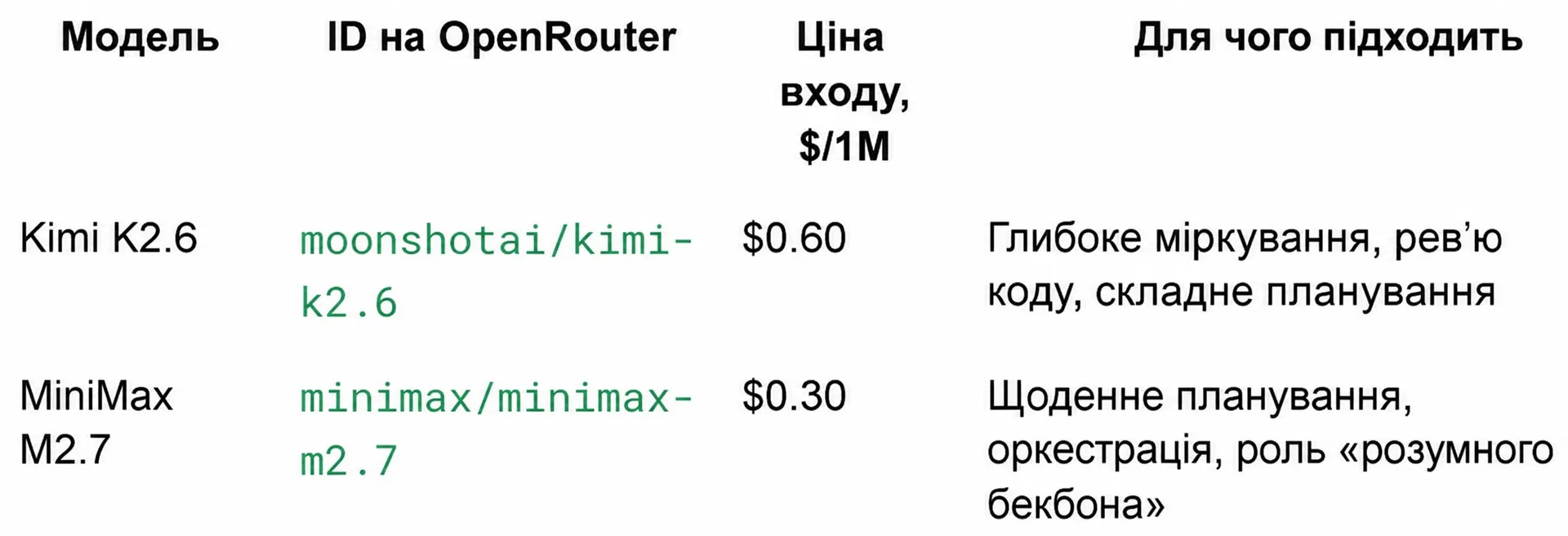
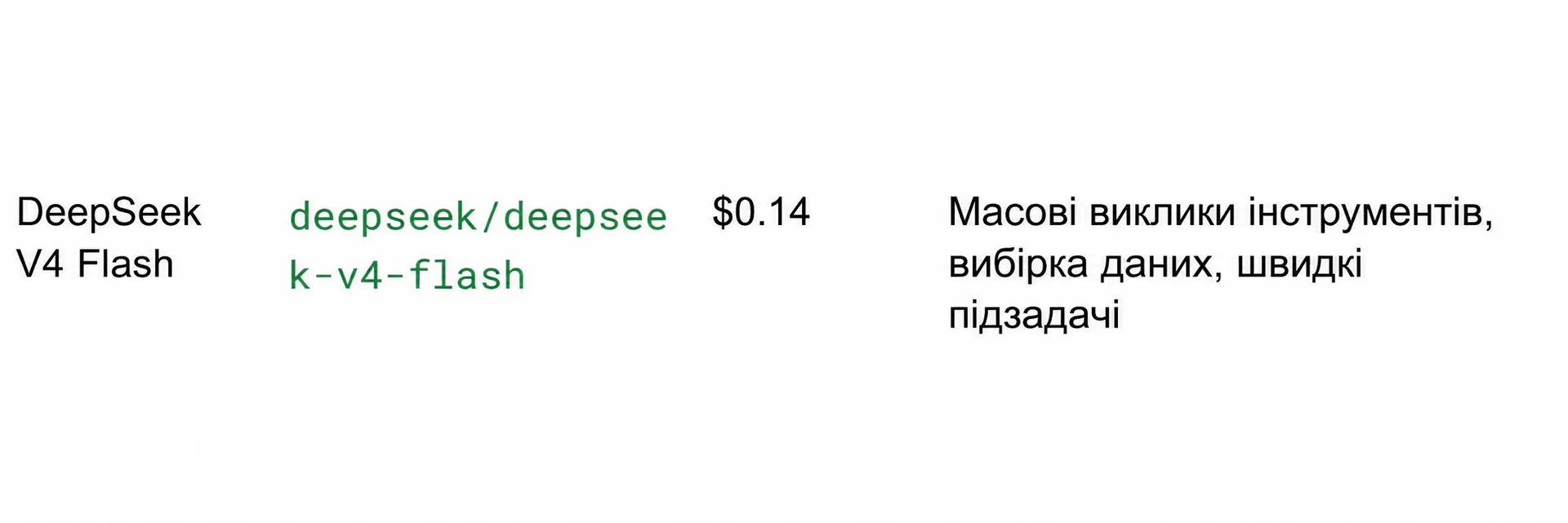
By distributing agent responsibilities across task-specialized models, monthly expenses drop to **$12–$22** without compromising analytical rigor.
### Recommended Model Strategy Matrix
| Agent Role | Model Choice | OpenRouter Identifier | Input Cost ($/1M) | Core Responsibility |
| :--- | :--- | :--- | :--- | :--- |
| **Planner & Backbone** | MiniMax M2.7 | `minimax/minimax-m2.7` | $0.30 | Session orchestration, intent decomposition, workflows |
| **Reviewer & Reasoning** | Kimi K2.6 | `moonshotai/kimi-k2.6` | $0.60 | Deep reasoning, automated code review, edge-case checks |
| **Fast Tool Executor** | DeepSeek V4 Flash | `deepseek/deepseek-v4-flash` | $0.14 | Rapid terminal operations, bulk scraping, data parsing |
| **Vision Subsystem** | Gemma 4 26B IT | `google/gemma-4-26b-a4b-it:free` | Free | Screenshot interpretation, visual asset evaluation |
### YAML Model Router Configuration
Open the agent settings file:
```bash
hermes config edit
```
Populate the configuration with the structured role hierarchy below:
```yaml
model:
provider: openrouter
default: minimax/minimax-m2.7
roles:
planner: minimax/minimax-m2.7
executor: deepseek/deepseek-v4-flash
reviewer: moonshotai/kimi-k2.6
vision: google/gemma-4-26b-a4b-it:free
fallback:
- deepseek/deepseek-v4-flash
- google/gemma-3-12b-it:free
compression:
enabled: true
threshold: 0.50
```
To persist the API key globally via the CLI:
```bash
hermes config set OPENROUTER_API_KEY sk-or-v1-your-key-here
```
> [!TIP]
> **Enforcing Budget Ceilings:** Always configure an explicit hard monthly spending limit in your OpenRouter account (`Settings` → `Credits` → `Monthly limit`). Setting an initial limit of **$15/month** guarantees that recursive loops or runaway scraping routines cannot drain your credit balance.
---
## 5. Security Hardening and Messaging Gateway Integration
Connecting Hermes to messaging services enables remote mobile command execution via Telegram or Discord.
> [!IMPORTANT]
> **Strict Terminal Access Warning:** Any user who communicates with your Hermes bot possesses **unrestricted shell execution privileges** within the container. Never deploy a publicly accessible bot without configuring explicit user ID whitelisting!
### Telegram Gateway Setup Procedure
:::tabs
@tab 1. Bot Creation
1. Open `@BotFather` in Telegram.
2. Issue the `/newbot` command and assign a handle.
3. Securely record the resulting API token (e.g., `123456789:ABCdef...`).
@tab 2. Identity Verification
1. Message `@userinfobot` on Telegram.
2. Copy your unique numeric user ID (e.g., `987654321`).
@tab 3. Environment Variables
Add your credentials to the container's `.env` file:
```bash
TELEGRAM_BOT_TOKEN="123456789:ABCdef..."
TELEGRAM_ALLOWED_USERS="987654321"
```
:::
Start and monitor the gateway background service:
```bash
# Check gateway operational status
hermes gateway status
# Tail real-time gateway events and inbound messages
tail -f ~/.hermes/logs/gateway.log
```
---
## 6. Practical Workflow: Self-Learning and Reusable Skill Compounding
The distinguishing advantage of Hermes compared to stateless API calls is **knowledge compounding**. The agent records multi-step operational discoveries directly into `~/.hermes/skills/`.
```mermaid
sequenceDiagram
autonumber
actor Dev as Engineer
participant H as Hermes Agent
participant Web as Reddit API / Web
participant Disk as ~/.hermes/skills/
Dev->>H: Send initial exploratory prompt
H->>Web: Query r/LocalLLaMA for trending agent frameworks
Web-->>H: Return community discussions and links
H->>H: Synthesize key findings and voice criteria
H->>Disk: Persist procedural logic to reddit-trending-frameworks.md
H-->>Dev: Return formatted 9-bullet summary
Note over Dev,Disk: Subsequent Execution
Dev->>H: "Run reddit-trending-frameworks on r/aiagents"
H->>Disk: Load compiled procedural rules
H->>Web: Target new community with optimized calls
H-->>Dev: Deliver instantaneous structured report
```
### Demonstrating Autonomous Skill Generation
Provide Hermes with an exploratory research instruction:
```text
Research the top 3 trending AI agent frameworks on r/LocalLLaMA this week. Use my voice — punchy, no jargon, no AI-speak. Three bullets per framework. Save this whole workflow as a reusable skill called reddit-trending-frameworks.
```
### Execution and Persistence Lifecycle
1. **Execution:** Hermes conducts automated web lookups, aggregates discussion threads, and filters marketing fluff.
2. **Formatting:** It outputs a concise 9-bullet summary respecting your defined voice parameters.
3. **Skill Compilation:** The agent writes the procedural routine to `~/.hermes/skills/reddit-trending-frameworks.md`.
Verify that the skill document has been written to disk:
```bash
ls -la ~/.hermes/skills/
```
### Zero-Shot Execution on New Target Domains
To repeat this task on a different target community, you no longer need to write a lengthy prompt or redefine stylistic parameters:
```text
Run my reddit-trending-frameworks skill on r/aiagents instead
```
Hermes immediately executes the saved procedure, requiring fewer token round-trips and executing measurably faster than the exploratory run.
---
## 7. Diagnostics and Troubleshooting
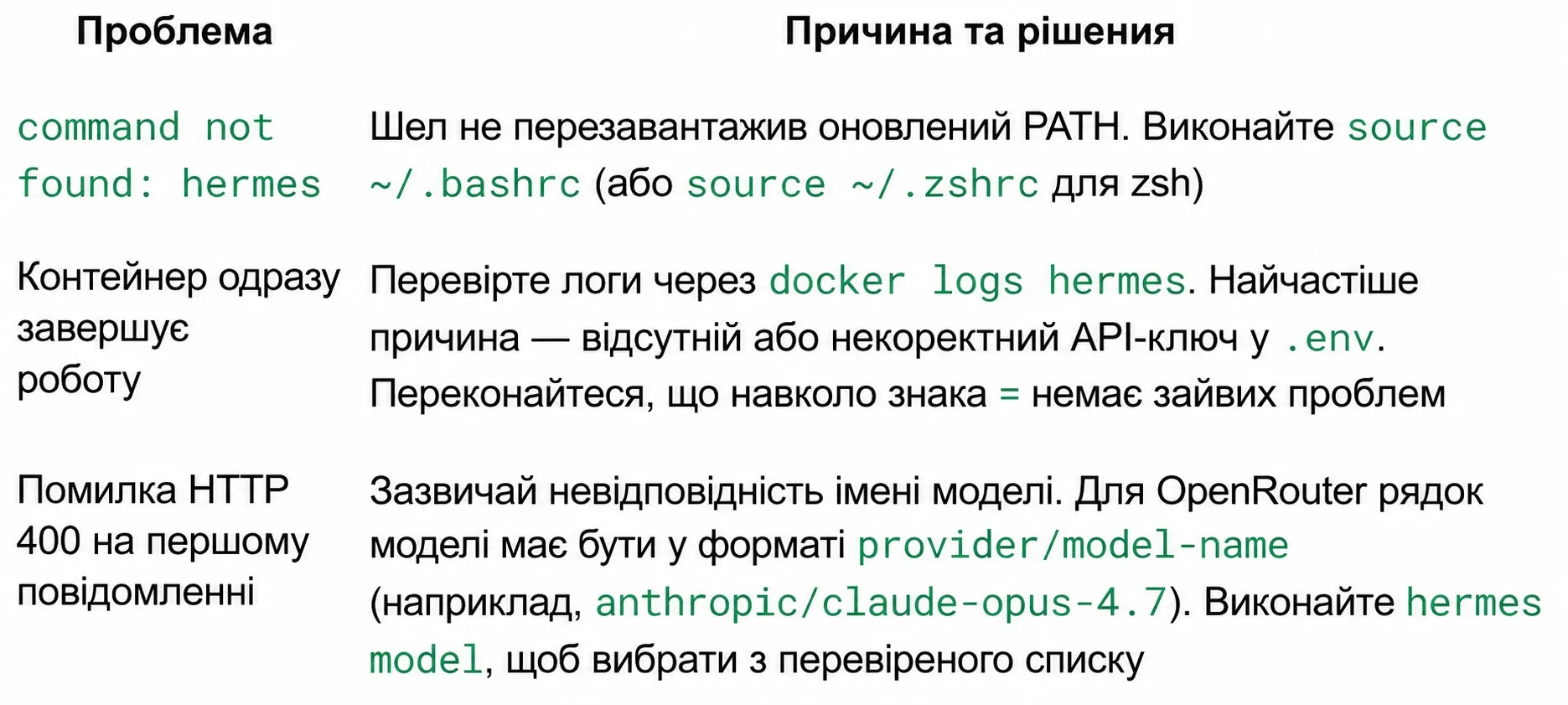
When launching Hermes on a fresh VPS, environment discrepancies may occasionally interrupt initialization.
### Troubleshooting Matrix
| Error Manifestation | Root Cause | Verified Resolution |
| :--- | :--- | :--- |
| `command not found: hermes` | System shell did not reload modified environment paths. | Execute `source ~/.bashrc` (or `source ~/.zshrc` for zsh). |
| Container exits immediately upon startup | Missing or malformed API token inside `.env`. | Inspect runtime logs via `docker logs hermes`. Ensure there are no spaces surrounding the `=` operator. |
| `HTTP 400` error on initial message | Incompatible or mistyped model identifier. | For OpenRouter, enforce the `provider/model-name` format (e.g., `minimax/minimax-m2.7`). |
| Telegram bot remains unresponsive | Inbound messages originate from an unlisted user. | Run `tail -f ~/.hermes/logs/gateway.log` and verify that your numeric ID is included in `TELEGRAM_ALLOWED_USERS`. |
---
## 8. Production Readiness Checklist
Before transitioning Hermes into your daily engineering workflow, ensure all items are fulfilled:
- [ ] VPS provisioned with at least 2 vCPUs and 8 GB RAM.
- [ ] Container `nousresearch/hermes-agent:latest` actively running via Docker.
- [ ] Diagnostic command `hermes doctor` reports clean environmental checks.
- [ ] Multi-model role allocation verified in `~/.hermes/config.yaml`.
- [ ] Monthly budget cap configured in OpenRouter settings.
- [ ] `TELEGRAM_ALLOWED_USERS` populated with authorized user IDs.
- [ ] Test CLI session completed and initial reusable skill written to disk.